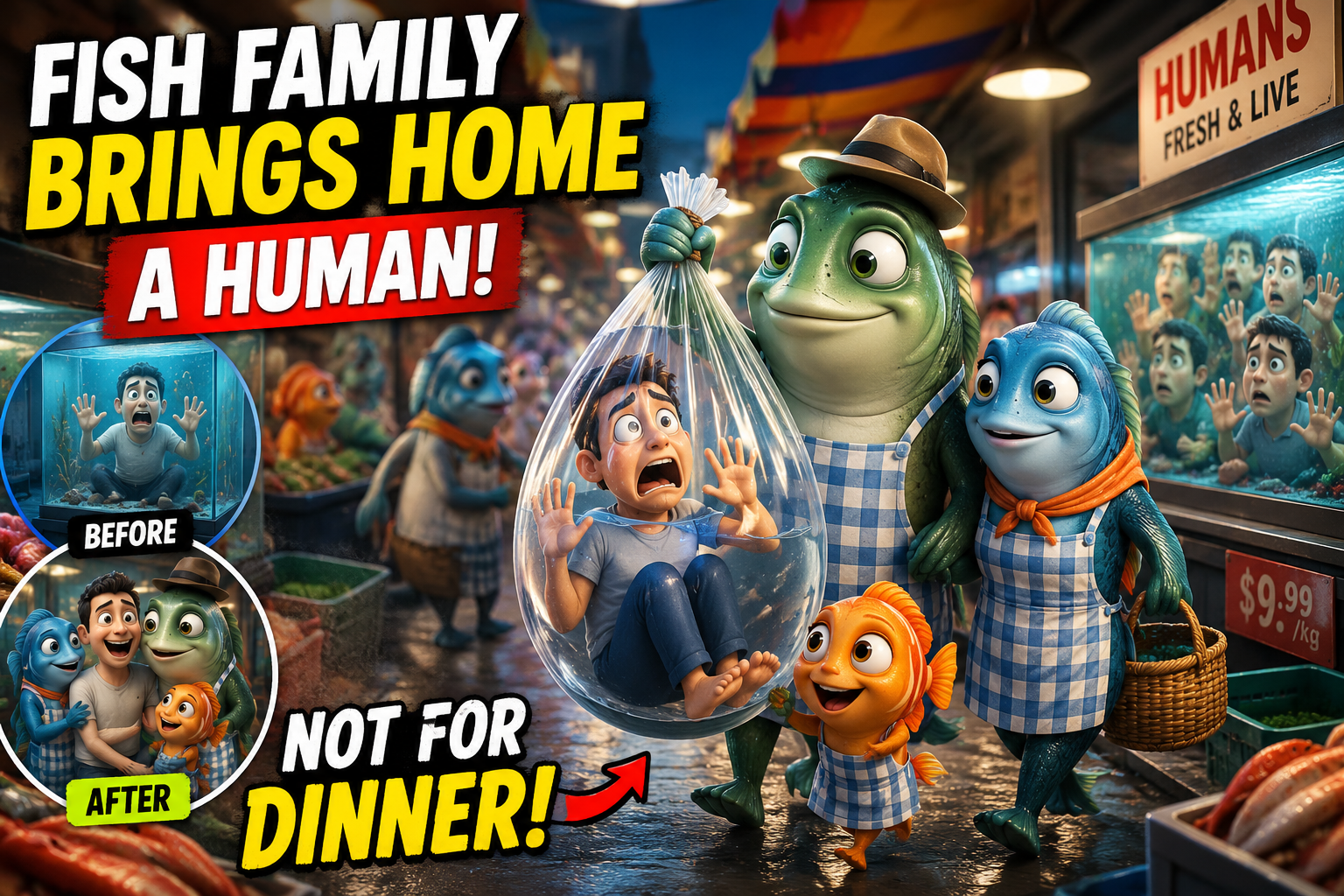
A strange, funny, and oddly heartwarming trend is taking over short-form video platforms right now: “Reverse World.” In this trend, the roles of humans and animals are flipped — and one video in particular has caught everyone’s attention: “Fish Family Brings Home a Human From the Market — But Not for Dinner.”
At first glance, it looks like a simple gag. But behind the 15-second clip is a surprisingly structured AI production process that any creator can replicate. Here’s how the concept came together — and the exact toolchain used to build it.
What Is the “Reverse World” Trend?
The idea behind Reverse World is a classic role-reversal twist: instead of humans buying fish at a market, a family of anthropomorphic fish walk through a bustling seafood market where humans are the ones kept in tanks, waiting to be “purchased.” A fish family picks out a frightened human and takes him home — not to eat him, but to keep and love him, the way we keep pets.
It’s a small idea, but it works because it flips something painfully familiar (a fish market) into something emotionally uncomfortable and funny at the same time. That contrast — cute animation style plus a dark-but-sweet premise — is exactly what makes this kind of content spread fast on platforms like Instagram Reels, TikTok, and YouTube Shorts.
The Complete Production Workflow
Videos like this aren’t made with a camera or a studio — they’re built entirely with AI tools, chained together in three stages. Here’s the exact workflow:
1. Ideation & Prompt Engineering — Claude / ChatGPT
Every good AI video starts with a strong concept and a well-engineered prompt. This is where large language models like Claude or ChatGPT come in. At this stage, the creator works out:
- The core story concept and emotional twist (in this case, “not for dinner”)
- Detailed character descriptions — the fish family’s appearance, expressions, and wardrobe (aprons, hats, scarves)
- Scene-by-scene visual prompts describing camera angle, lighting, and mood
- Short captions or on-screen text to support the storytelling
This step matters more than people realize. A vague prompt produces generic, forgettable animation. A specific, well-structured prompt — describing exact framing, character emotion, and setting — is what makes the final output look intentional and cinematic rather than random.
2. Video Animation — Flow AI
Once the prompts are locked in, they’re fed into an AI video generation tool — in this case, Flow AI — to turn text into motion. This stage handles:
- Rendering the Pixar-style 3D character animation
- Building the market environment (stalls, lighting, banners, crowd)
- Animating facial expressions and body language for emotional beats
- Generating camera movement and scene transitions
Modern AI video models like this can produce studio-quality animated scenes without any traditional 3D modeling, rigging, or rendering pipelines — which is what’s made this entire genre of content possible for solo creators.
3. Video Editing — CapCut
The final stage is assembly and polish, done in CapCut. This is where the raw AI-generated clips become an actual finished video:
- Sequencing and trimming clips for pacing
- Adding background music and sound effects
- Layering in captions and text overlays
- Adjusting aspect ratio and export settings for vertical, mobile-first platforms
CapCut’s mobile-friendly interface and built-in effects library make it one of the most popular finishing tools for short-form AI content creators, since it requires no professional editing experience.
Why Is Reverse World Content Going Viral?
A few things explain why this specific style of video performs so well:
- A genuinely novel concept. Role-reversal storytelling triggers curiosity within the first second — viewers want to see how the flip plays out.
- High production value. AI animation tools now produce visuals close to professional 3D studio quality, which stops the scroll.
- An emotional payoff. The “not for dinner” twist turns a slightly unsettling setup into something sweet, which is highly shareable.
- Short, platform-native format. A 15–20 second runtime is built for Reels, TikTok, and Shorts algorithms.
- Zero-budget accessibility. Anyone with a laptop or phone can now produce animated content that used to require a full studio team.
Tips for Creators Who Want to Try This
If you want to build your own Reverse World–style video, keep these points in mind:
- Keep the core idea simple — one clear twist is more effective than a complicated plot
- Be extremely specific in your prompts: describe emotion, camera angle, and setting, not just “a fish market scene”
- Spend real time on sound design and pacing during editing — this is often what separates amateur output from professional-feeling content
- Optimize aspect ratio and length for the platform you’re posting on
Final Thoughts
The Reverse World trend is more than just a funny video format — it’s a clear example of how AI has democratized animated storytelling. A single creator can now go from idea to finished, professional-looking animated short using nothing but a laptop and three tools: Claude or ChatGPT for ideation, Flow AI for animation, and CapCut for editing.
As AI video generation tools continue to improve, expect to see a lot more of this — creative, emotionally driven, slightly absurd concepts that would have needed a full production studio just a couple of years ago.
FAQs
What tools were used to make the Reverse World fish market video? The video was created using a three-tool workflow: Claude/ChatGPT for ideation and prompt engineering, Flow AI for animated video generation, and CapCut for final editing.
Can anyone create this type of AI animated video? Yes. These tools are designed to be accessible — with practice writing detailed prompts, beginners can produce high-quality short-form animated content without any prior animation or filmmaking experience.
Why is it called “Reverse World”? The name refers to the role-reversal concept at the heart of the trend — in this case, fish become the shoppers and humans become the “product,” flipping a familiar real-world scenario on its head for comedic and emotional effect.